


These instructions use the example from the section ⮫ “Creating Cams” to demonstrate how to change a Cam.
Changing the path with the graphical editor
-
Open the “Rotary table” Cam in the editor.
The “Cam” tab is visible.
-
Select the point at 120 and 240 and delete them by pressing the key [Del].
-
Select the “Add point” tool from the “ToolBox” view.
The mouse pointer turns into crosshairs when you move it into the editor.
-
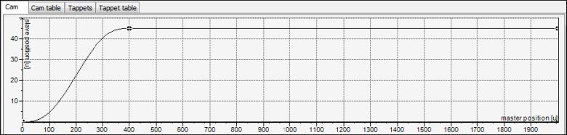
Click near “Master position” 400 and “Slave position” 45 in the upper graphs (slave position).
The curve of the slave position is changed. The curves of velocity, acceleration, and jerk also change.
-
Select the new inserted point by clicking it.
-
Drag the point to another position.
The curve of the slave position is adjusted accordingly.
-
Select this point and open the properties view and change the “X” value to 400 and the “Y” value to 45.
-
9. Using the same method, change the end point to an “X” value of 2000 and “Y” value to 45.
-
Select the “Select” tool from the “ToolBox” view.
-
Select the second curve element (between 400 and 2000).
-
Change the “Segment type” property to “Line”.
-
Check the curve in the graphical editor.
Changing the Cam path with a “Cam table” editor
-
Open the “Vertical axis” Cam in the editor.
The “Cam” tab is visible.
-
Select the “Cam table” tab.
-
Delete the points at 120 and 240 by clicking the
 symbol.
 -
Click the
 symbol.
A new point and a new segment are inserted at (1000/150).
-
Add two more points.
-
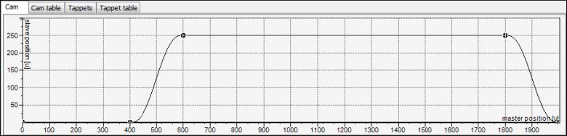
Change the values X/Y of the following points:
-
Point 1: 0 / 0
-
Point 2: 400 / 0
-
Point 3: 600 / 250
-
Point 4: 1800 / 250
-
Point 5: 2000 / 0
The curve of the slave position is changed. The curves of velocity, acceleration, and jerk also change.
-
-
In the “Cam table”, change the “Segment type” of the first and third segments to “Line”.
-
Check the curve in the graphical editor.
By clicking “Display generated Code,” you can display the automatically created global variables.
-
Application program using a generated Cam and Tappet table
-
Importing a Cam from 3rd party CODESYS controller