


Function key [CFG] menu level 1, with ETH1/ETH2 mode:“Two separate interfaces”
⮫ “Switch functionality of Ethernet interfaces ETH1/ETH2”
Navigation starts with the processor module being in RUN/STOP mode (State 0). By pressing one of the 5 function keys a certain action is triggered. The result of this action is described in the result columns of the tables.
|
State |
Description - [CFG] menu level 1 |
Result on pressing one of the function keys |
||||
|---|---|---|---|---|---|---|
 |
 |
 |
 |
 |
||
|
0 |
The processor module is in RUN/STOP mode. |
State 1 is displayed. |
Remains in RUN/STOP mode. |
Remains in RUN/STOP mode. |
||
|
1 |
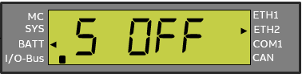 Switch is OFF |
Refers to submenu level 2. ⮫ “Function key [CFG] submenu show/set PLC ID ” |
State 2 is displayed if KNX functionality is active. State 3 is displayed if KNX functionality is inactive. |
State 6 is displayed. |
Return into RUN/STOP mode. |
|
|
2 |
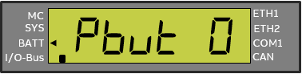 KNX program button (appears if functionality is active). |
State 3 is displayed. |
State 1 is displayed. |
Return into RUN/STOP mode. |
||
|
3 |
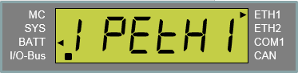 |
Refers to submenu level 2 ⮫ “Function key [CFG] menu level 2 (IPETH1 or IPETH2); ” |
State 4 is displayed. |
State 2 is displayed. |
Return into RUN/STOP mode. |
Only active if no changes in CFG menu. Return into RUN/STOP mode. |
|
4 |
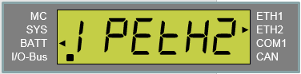 |
Refers to submenu level 2 ⮫ “Function key [CFG] menu level 2 (IPETH1 or IPETH2); ” |
State 5 is displayed. |
State 3 is displayed. |
Return into RUN/STOP mode. |
|
|
5 |
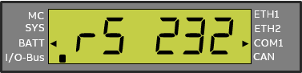 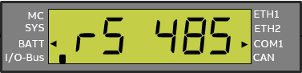 Note: COM1 mode RS-232 (default) or RS-485 can only be shown but not changed. This is a PLC boot parameter ⮫ “Setting up a serial interface” and must be set in AB ⮫ “Configuration”. Mode is activated in PLC boot process. |
State 6 is displayed. |
State 4 is displayed. |
Return into RUN/STOP mode. |
Return into RUN/STOP mode. |
|
|
6 |
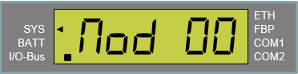 |
Refers to submenu set startup mode of PLC. ⮫ “Function key [CFG] submenu show/set startup mode of PLC ” |
State 1 is displayed. |
State 5 is displayed. |
Return into RUN/STOP mode. |
|
Function key [CFG] menu level 1, with ETH1/ETH2 mode: “Switch functionality ETH1-ETH2”
⮫ “Switch functionality of Ethernet interfaces ETH1/ETH2”
Navigation starts with the processor module being in RUN/STOP mode (State 0). By pressing one of the 5 function keys a certain action is triggered. The result of this action is described in the result columns of the tables.
|
State |
Description - [CFG] menu level 1 |
Result on pressing one of the function keys |
||||
|---|---|---|---|---|---|---|
|
|
|
|
|
||
|
0 |
The processor module is in RUN/STOP mode. |
State 1 is displayed. |
Remains in RUN/STOP mode. |
Remains in RUN/STOP mode. |
||
|
1 |
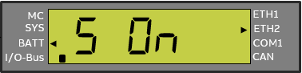 Switch is ON |
State 2 is displayed if KNX functionality is active. State 3 is displayed if KNX functionality is inactive. |
State 5 is displayed. |
Return into RUN/STOP mode. |
Return into RUN/STOP mode. |
|
|
2 |
KNX program button (appears if functionality is active). |
State 3 is displayed. |
State 1 is displayed. |
Return into RUN/STOP mode. |
Return into RUN/STOP mode. |
|
|
3 |
|
Refers to submenu level 2. ⮫ “Function key [CFG] menu level 2 (IPETH1 or IPETH2); ” |
State 4 is displayed. |
State 2 is displayed. |
Return into RUN/STOP mode. |
Only active if no changes in CFG menu. Return into RUN/STOP mode. |
|
4 |
Note: COM1 mode RS-232 (default) or RS-485 can only be shown but not changed. This is a PLC boot parameter ⮫ “Setting up a serial interface” and must be set in AB ⮫ “Configuration”. Mode is activated in PLC boot process. |
State 5 is displayed. |
State 3 is displayed. |
Return into RUN/STOP mode. |
Return into RUN/STOP mode. |
|
|
5 |
|
Refers to submenu set startup mode of PLC. ⮫ “Function key [CFG] submenu show/set startup mode of PLC ” |
State 1 is displayed. |
State 4 is displayed. |
Return into RUN/STOP mode. |
Return into RUN/STOP mode. |
Function key [CFG] menu level 2 (IPETH1 or IPETH2);
|
State |
Description - [CFG] menu level 2 |
Result on pressing one of the function keys |
||||
|---|---|---|---|---|---|---|
|
|
|
|
|
||
|
0 |
IPETH1 or IPETH2 |
State 1 is displayed. |
Return into RUN/STOP mode. |
Return into RUN/STOP mode. |
||
|
1 |
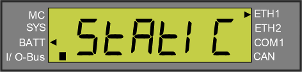 IP Configuration (address, subnet mask, gateway). |
Refers to submenu StAtIC. ⮫ “Function key [CFG] menu level 3, show/set STATIC” |
State 2 is displayed. |
State 4 is displayed. |
Case 1, no submenu is entered: Return into RUN/STOP mode. Case 2, no changes: State 0 is displayed. |
Send all changes to CPU. State 5 is displayed. |
|
2 |
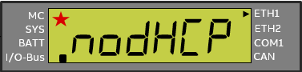 |
Refers to submenu set dHCP. ⮫ “Function key [CFG] menu level 2 Show/set DHCP” |
State 3 is displayed. |
State 1 is displayed. |
||
|
3 |
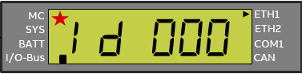 Activate DHCP Sets a DHCP address. |
Refers to submenu set Id. ⮫ “Function key [CFG] menu level 2 Show/set Id” |
State 4 is displayed. |
State 2 is displayed. |
State 1 is displayed. |
|
|
4 |
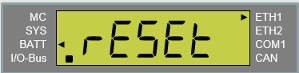 Reset to production data (default settings). |
Refers to submenu set rESEt. ⮫ “Function key [CFG] submenu show/set RESET” |
State 1 is displayed. |
State 3 is displayed. |
Send all changes to CPU. State 5 is displayed. |
|
|
5 |
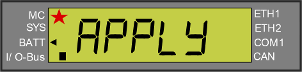 |
Remain all changes. State 1 is displayed. |
State 6 is displayed. |
|||
|
6 |
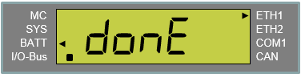 |
Changes applied donE is displayed for 2 sec. then return into RUN/STOP mode. |
||||
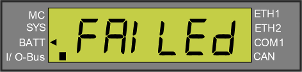 |
Changes failed FAILEd is displayed for 2 sec. then return into RUN/STOP mode. |
|||||
Function key [CFG] menu level 3, show/set STATIC
|
State |
Description - submenu STATIC |
Result on pressing one of the function keys |
||||
|---|---|---|---|---|---|---|
|
|
|
|
|
||
|
0 |
IP Configuration (address, subnet mask, gateway). |
State 1 is displayed. |
Aborts the menu unchanged. Return to IPETH1 or IPETH2 |
No changes: return to IPETH1 or IPETH2 Changes: (StAtIC blinks) state 5 of previous table is displayed. |
||
|
1 |
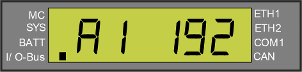 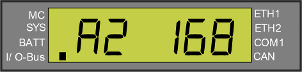 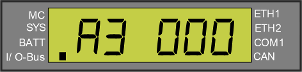 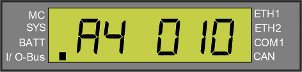 IP address A1-A4 If submenu is entered: Number is blinking if value has changed and is not yet sent to CPU. |
Refers to submenu of A1-A4 |
Count down A1-A4 |
Count up A4-A1 |
Aborts the menu unchanged. Return to CFG menu level 2 StAtIC. |
Take over new values, but don´t send to CPU. Return to CFG menu level 2 StAtIC. |
|
2 |
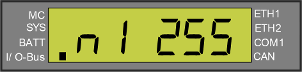 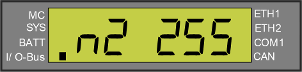 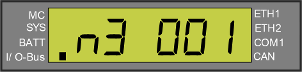 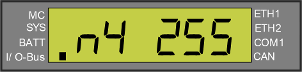 Subnet mask N1-N4 If submenu is entered: Number is blinking if value has changed and is not yet sent to CPU. |
Refers to submenu of N1-N4 |
Count down N1-N4 |
Count up N4-N1 |
Aborts the menu unchanged. Return to CFG menu level 2 StAtIC. |
Take over new values, but don´t send to CPU. Return to CFG menu level 2 StAtIC. |
|
3 |
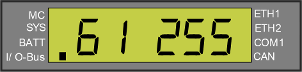 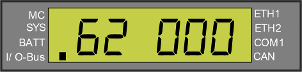 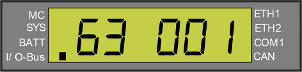 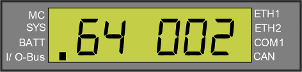 Gateway G1-G4 If submenu is entered: Number is blinking if value has changed and is not yet sent to CPU. |
Refers to submenu G1-G4 |
Count down G1-G4 |
Count up G4-G1 |
Aborts the menu unchanged. Return to CFG menu level 2 StAtIC. |
Take over new values, but don´t send to CPU. Return to CFG menu level 2 StAtIC. |
Function key [CFG] menu level 4, Example: I/P address A4
|
State |
Description - [CFG] menu level 4 |
Result on pressing one of the function keys |
||||
|---|---|---|---|---|---|---|
|
|
|
|
|
||
|
0 |
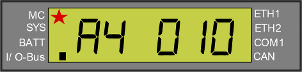 A4 is blinking if submenu is entered. |
No action |
Count down value. Value is blinking if changed. |
Count up value. Value is blinking if changed. |
Aborts the menu unchanged. Shows unchanged value. |
Take over new value, but don´t send to CPU. Go back to menu level 3 (here subnet mask N1). |
Function key [CFG] menu level 2 Show/set DHCP
|
State |
Description - show/set DHCP |
Result on pressing one of the function keys |
||||
|---|---|---|---|---|---|---|
|
|
|
|
|
||
|
0 |
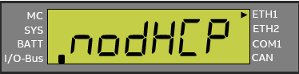 |
State 1 is displayed. |
Aborts the menu unchanged. |
|||
|
1 |
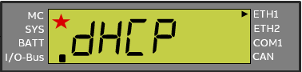 IP address A1-A4
|
State 2 is displayed. |
State 2 is displayed. |
Aborts the menu unchanged. Go back to CFG menu level 1. |
Take over new values, but don´t send to CPU. Text is blinking if value is changed. State 3 is displayed. |
|
|
2 |
|
State 1 is displayed. |
State 1 is displayed. |
Go to submenu StAtIC. |
||
|
3 |
|
Remain all changes State 1 is displayed. |
State 4 is displayed. |
|||
|
4 |
|
Changes applied donE is displayed for 2 sec. then return into RUN/STOP mode. |
||||
|
Changes failed FAILEd is displayed for 2 sec. then return into RUN/STOP mode. |
|||||
 Value is blinking if value has changed and is not yet sent to CPU.
Function key [CFG] menu level 2 Show/set Id
|
State |
Description - show/set Id |
Result on pressing one of the function keys |
||||
|---|---|---|---|---|---|---|
|
|
|
|
|
||
|
0 |
|
Count down value: 255 ... 000, starting with current value. |
Count up value: 000 ... 255, starting with current value. |
Case 2, no changes: stop blinking, return to menu. ⮫ “Function key [CFG] menu level 2 (IPETH1 or IPETH2); ” |
Go toCFG menu level 2 (IPETH1 or IPETH2) state 5-6. |
|
|
1 |
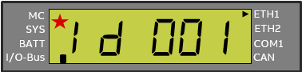 IP address A1-A4
|
Count down value: 255 ... 000, starting with current value. |
Count up value: 000 ... 255, starting with current value. |
Discard the changes. Stop blinking. Show previous value. |
Go toCFG menu level 2 (IPETH1 or IPETH2) state 5-6. |
|
|
2 |
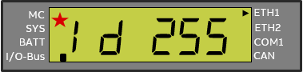 |
Count down value: 255 ... 000, starting with current value. |
Count up value: 000 ... 255, starting with current value. |
Discard the changes. Stop blinking. Show previous value. |
Go toCFG menu level 2 (IPETH1 or IPETH2) state 5-6. |
|
Function key [CFG] submenu show/set RESET
|
State |
Description - submenu show/set RESET |
Result on pressing one of the function keys |
||||
|---|---|---|---|---|---|---|
|
|
|
|
|
||
|
0 |
|
State 1 is displayed. |
No action |
No action |
Aborts the menu unchanged. Return to submenu level 1 |
|
|
1 |
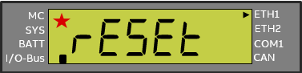
|
Aborts the menu unchanged. Return to submenu level 1 |
Discard all made changes. Stop blinking. Send command "reset to factory settings" to CPU. Reset ask confirmation. Go back to default menue RUN/STOP. State 2 is displayed. |
|||
|
2 |
|
Aborts the menu unchanged. Return to submenu STATIC |
Sends changed values to CPU, displays state 3. |
|||
|
3 |
|
Changes applied donE is displayed for 2 sec. then return into RUN/STOP mode. |
||||
|
Changes failed FAILEd is displayed for 2 sec. then return into RUN/STOP mode. |
|||||
Function key [CFG] submenu show/set startup mode of PLC
|
State |
Description - submenu show/set startup mode of PLC |
Result on pressing one of the function keys |
||||
|---|---|---|---|---|---|---|
|
|
|
|
|
||
|
Start |
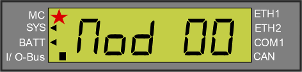 |
Count down value: 02 ... 0, starting with current value. |
Count up value: 00 ... 02, starting with current value. |
Aborts the menu. Go back to main menue RUN/STOP. |
Sends changed values to CPU. Displays 2 sec. donEor FAILEd. Go back to main menue RUN/STOP. |
|
|
1 |
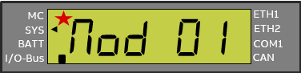
|
Count down value: 02 ... 00, starting with current value. |
Count up value: 00 ... 02, starting with current value. |
Aborts the menu. Go back to main menue RUN/STOP. |
||
|
2 |
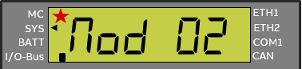
|
Count down value: 02 ... 00, starting with current value. |
Count up value: 00 ... 02, starting with current value. |
Aborts the menu. Go back to main menue RUN/STOP. |
||
Function key [CFG] submenu show/set PLC ID
|
State |
Description - submenu show/set PLC ID |
Result on pressing one of the function keys |
||||
|---|---|---|---|---|---|---|
|
|
|
|
|
||
|
0 |
Switch is OFF |
State 1 is displayed |
Return into RUN/STOP mode. |
|||
|
1 |
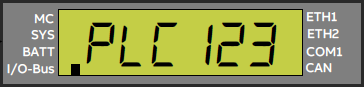 PLC ID |
State 2 is displayed |
State 2 is displayed |
Return into RUN/STOP mode. |
||
|
2 |
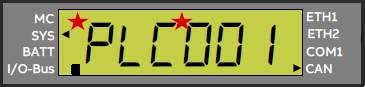 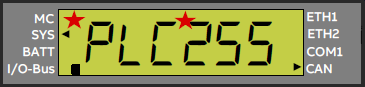
|
Count down value: 255®0, starting with current value. |
Count up value: 000®255, starting with current value. |
Aborts the menu. Go back to main menue RUN/STOP. |
Takes over new value, if changed. |
|