


There are some steps to start with logging data into a CSV file:
-
Define what to be logged:
Input SELECTION is selection of predefined values to be logged. Bit 0 to Bit 8 are to make different selection. If Bit x=TRUE: the corresponding value will be logged.
-
Bit 0: Control Word
-
Bit 1: Status Word
-
Bit 2: Set Temperature
-
Bit 3: Actual Temperature
-
Bit 4: Duty Cycle
-
Bit 5: Control State
-
Bit 6: Output State
-
Bit 7: Latest Error
-
Bit 8: Consolidated Error
-
-
Define when to trigger log:
-
Define an external trigger with LogTrigger. It is recommended to use a timer, e.g BLINK function block. The LogTrigger should be defined as greater than 1s, other-wise there might be a possibility of the log data getting lost.
-
Additional to LogTrigger, an internal trigger can be activated with bit 4 of input Mode, which creates a trigger if there is change in the control word or status word.
-
-
Define when to log data:
With bit 1 and bit 0 of input Mode, it can be defined when to log data if log trigger is active. This settling can be used to optimize the storge size for data logging by re-ducing the number of data sets to be logged.
This is a combination of Bit 1 and Bit 0 as below
-
00: Log all items as long as log trigger is active
-
01: Log, if one of the log values changes, when trigger is active.
-
11: Log, if CW or SW changes or ActTemp changes out of threshold (+/-Threshold), when trigger is active.
If Mode 11, the input Threshold must be defined.
-
-
Input Threshold
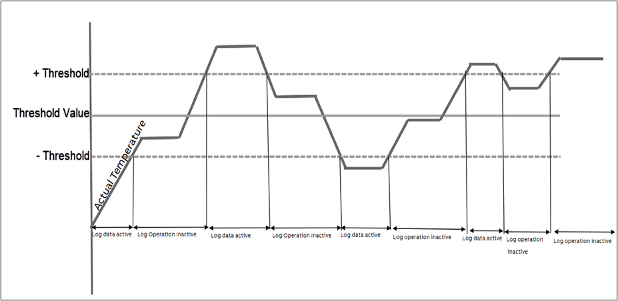
Log will be active when the actual temperature is out of the threshold value (+/ Threshold). See the below figure which explains when the log is active and inactive. (Bit 10: 11: Threshold of actual temperature)
-
Define the log buffer
A log buffer in data area needs to be defined for all zones to collect the log data before data is written to a log file. The log buffer contains continuous area for each zone individually. The first address of the log buffer needs to be assigned to input AdrLogBuffer. It is rec-ommended to use a data area with a fixed address, e.g. %M area.
The input NumberBufferEntry specifies the size of a log area for each zone in number of log en-tries. A log entry stands for a data set containing the predefined log values with input Selection. The total amount of log entries of the entire log buffer will be NumberBufferEntry x Number-OfZone.
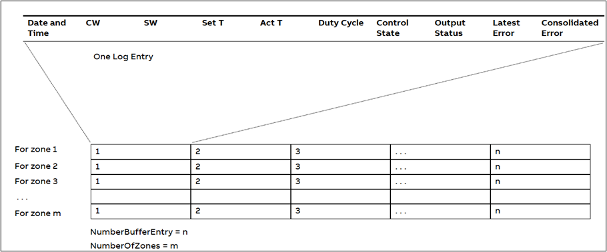
The NumberBufferEntry should be defined as large as possible to reduce the frequency of saving the log buffer into log files, thus reducing CPU load. It is recommended to define, NumberBufferEntry > NumberOfZone x 2, otherwise log data could get lost.
The data size of a log entry depends on the input Selection, the size can be about 20 bytes to 100 bytes. This information can be seen at run time from the output EntrySize and the total size of the log buffer is displayed at output BufferSize. It is very important to check the BufferSize output to make sure that enough data area is available for the defined log buffer, otherwise undesired behavior can happen in PLC which might lead to the PLC going to exception. The following link shows the available %M area of different CPU types
-
Define where to save the log files:
It is recommended to save log files on memory card. The folder for saving to be specified at input FilePath, e.g. ‘sdcard/folder’. External disk, like SdCard must be specified in FilePath.
The following folder will be created if it does not exist, when function block is enabled (In-put Enable = TRUE). But only one folder level will be created, this means the parent folder must already be existing. Bit 8 and bit 9 of input MODE can be used to specify the subfolder.
Bit 8 and bit 9 of input MODE can be used to specify the subfolder.
-
Bit 8: FALSE: Create subfolder automatically; TRUE: Do not create subfolder.
-
Bit 9: Valid, if bit 8 is FALSE.
False: subfolder name with index in Decimal
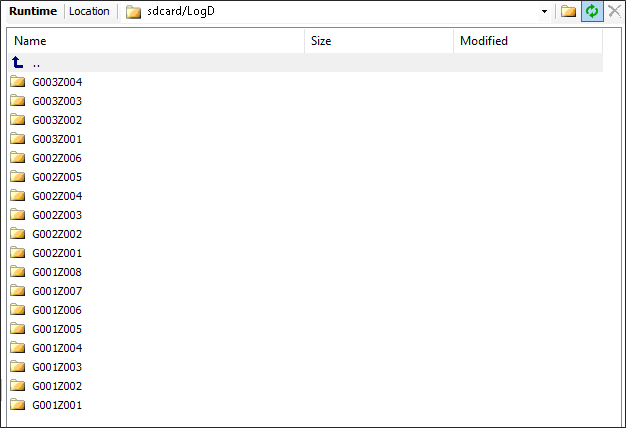
Example for group 10, index 3, subfolder name is G010Z003.
-
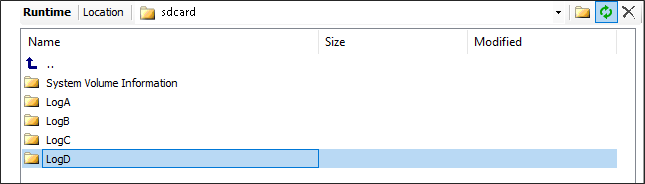
The following is an example of FilePath = ‘sdcard/LogD’ and input Mode bit 8 = false, bit 9 = false.
-
Define when to create a new log file:
The function block creates individual log files for each zone.
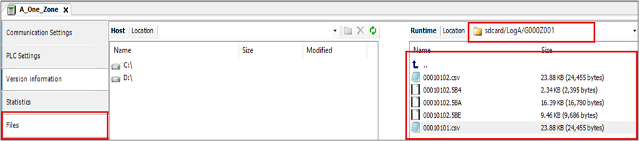
As soon as the log area for each zone is full, that area will be written into a CSV file in the predefined folder. The file name contains the group and zone index as well as date information: ggzzmmdd.csv. Where:
-
‘gg’ for group index in hexadecimal
-
‘zz’ for zone index in hexadecimal
-
‘mm’ for month of the year
-
‘dd’ for day of the month
Input NumberFileEntry is to be defined how many entries a log files can have before creat-ing a new log file. Before creating a new log file, the existing one will be backed up with re-named file extension. For example, change ggzzmmdd.csv into ggzzmmdd.E74. The exten-sion is composed of the last three hexadecimal numbers of current time without seconds. In this way, the file overwriting is avoided, and all the log history is still available.
If NumberFileEntry is 0, then a new log file will be created daily.
The following is an example of saved log files:
-
-
Common inputs:
NumberOfZone: Number of zones to be logged into the .csv file or displayed in visuali-zation. It is recommended to use one TectLogFile for the whole system.
If there exists a case where the User wants to configure a large number of zones/group and complete Selection a big buffer size, which results in a requirement of the memory ar-ea greater than the %M area of that particular PLC, it is suggested to use the array of the required memory size and assign it to the AdrLogBuffer.
FirstZoneData: First structure of process data and parameters for the zone. Detailed de-scription can be found in the integrated documentation.
-
Manual operations:
-
Save the log buffer into files manually: with a rising edge at input ManualSave all the data in the log buffer will be saved into the log files immediately without wait-ing for the NumberBufferEntry value.
-
Clear log buffer: with a rising edge at input ClearBuffer all data in the log buffer will be cleared. But before clearing, the new entries in the logging buffer are writ-ten into the .csv file first. Then the .csv file is renamed into a backup file with the same file name but different extension, which is composed of the last three hexa-decimal numbers of current time without seconds. In this way, even after a clear log buffer action, the history in the buffer will not get lost.
-
-
How to reduce the value of output NumberLogLost (number of logs which are lost):
-
Don’t create subfolder (Mode - bit8=True) or first enable the function block with input Enable = True until all folders are created (Output – FolderCreated = True) then start logging with input EnableLog = True.
-
Increase the interval of input LogTrigger if possible (recommendation: at least 2 seconds or more).
-
Reduce the Selection to the necessity and increase the NumberBufferEntry if possible.
-
The second buffer will allocate dynamic memory on PLC. Depending on the application, it could cause system error if the second buffer is so large that the system cannot allocate memory any more.