


After an update of Automation Builder, the device repository contains only ABB devices. Third-party devices that were installed in previous versions of Automation Builder are not installed automatically in the latest version profile. This must be triggered manually.
The feature “Migrate third party devices” is available as of Automation Builder 2.1.1.
-
Select “Tools” in the main menu of Automation Builder.
-
Select “Migrate third party devices” in the drop-down list.
The “Version profile selection” window appears.
-
Select a version profile in the drop-down list contains previous Automation Builder / Control Builder Plus profiles. The active profile is not shown in the list.
After selecting a previous version profile, all third-party devices that were installed in this version profile are listed.
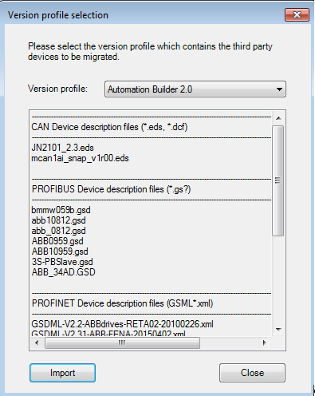
It is not possible to select or deselect some third-party devices. Importing affects all third-party devices listed in the list view.
-
Select [Import].
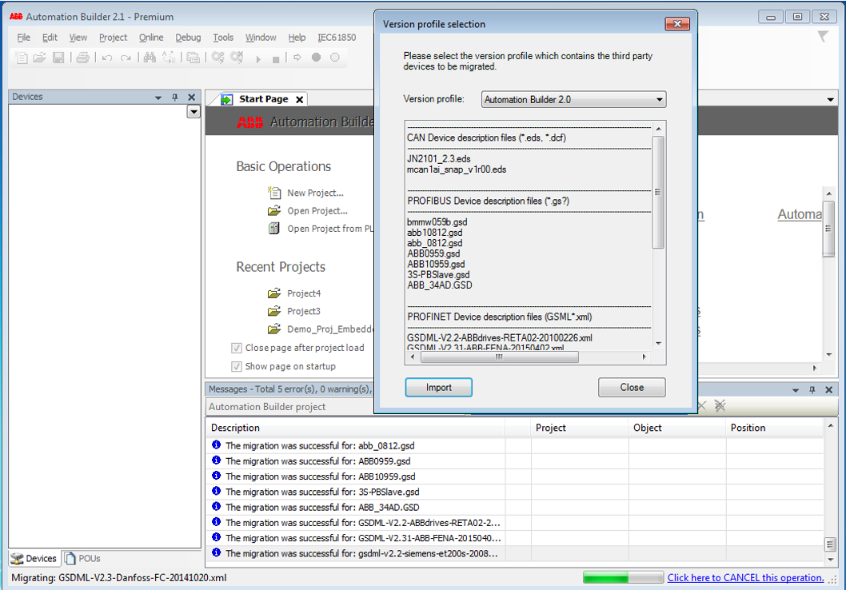
During the migration, the message window displays whether the device migration was successful or failed.
If the migration fails, the affected third‑party device description must be installed manually via “Tools Device Repository Install”.
In the status bar, the third-party device that is on “Migrating: <...>” is displayed on the left side.
The import operation can be canceled by clicking the “Click here to CANCEL this operation” link on the right side of the status bar. This becomes effective when the migration of the migrating third-party device is finished.
-
To close the dialog, select [Close] in the Version profile selection window.