


The following settings are possible in the ETS parameters of the PS5604-KNX AC500.
Tab General settings
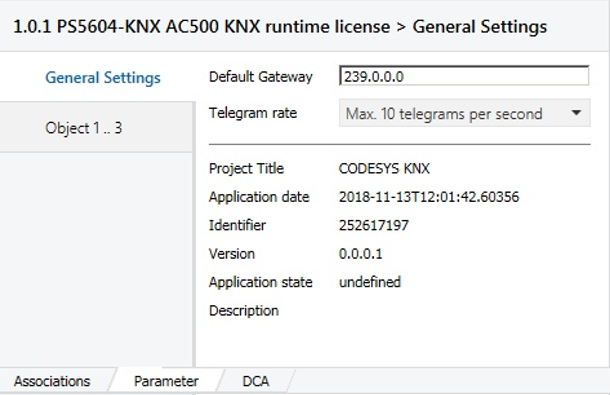
-
Default Gateway:
The used KNXnet/IP broadcast address. This must match the KNX system (KNX IP router). It is the default setting that is usually not changed.
-
The entry field Default Gateway can contain another IP address for the Multicast communication. The normal Multicast IP address for KNX ist 224.0.23.12.
-
If another Multicast IP address is to be used, it can be chosen in the area from 239.0.0.0 to 239.255.255.255. This alternative Multicast IP address can be defined in the input field Default Gateway.
-
-
Telegram rate:
The maximum transmission rate of the PLC can be limited in order to prevent an excessive bus load and thus to avoid malfunction of the KNX system.
The KNX telegrams are buffered until they have been sent. New values which have been calculated by the automation program in the meantime are updating the cached values. The old cached value is discarded and not sent.
-
Project Information:
At this point, the project information of the Automation Builder project is displayed.
Tab Object 1 .. 3
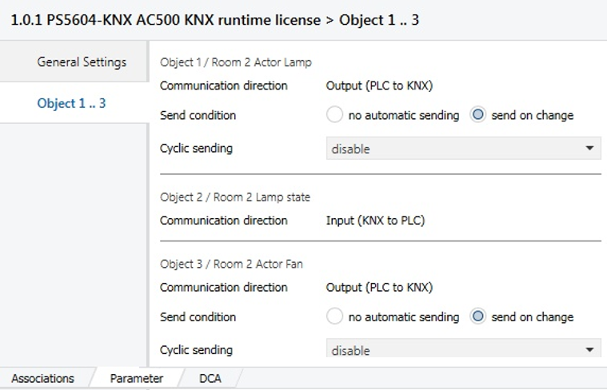
For each KNX Group Object of the PLC an Object entry is displayed in the device parameters. This is named after the number of the KNX Group Object.
For outputs (controller sends to the KNX bus) the KNX transmission conditions can be set:
-
Communication direction:
Setting of the transmission direction of the object.
-
Input (KNX to PLC): The controller receives values from the KNX bus.
-
Output (PLC to KNX): The controller sends values to the KNX bus.
-
-
Send condition (only for outputs):
Setting whether the Controller sends a telegram to the KNX bus automatically when the object value is changed. The following options are available
-
No automatic sending:
No automatic sending to the KNX bus. This must be done via the program code by the Trigger Output flag.
-
Send on change:
Every time the object value changes, a telegram is sent to the KNX bus. No matter how minor this change is.
-
Send on difference (only for group objects which are not DPT 1.* Boolean): Every time the object value changes, this value is only sent to the KNX bus if it differs from the last sent value at least by the settable difference.
-
-
Sending difference (only if Send on difference is active):
Input of the difference by which the object value must change to be send. You can enter numbers with decimal places.
-
Cyclic sending (only for outputs):
Setting whether in addition the object value is sent cyclically repeatedly to the bus. This also happens if this object value has not changed. Two different range of values for the cycle time can be specified.
-
Cycle time (only when Cyclic sending is active):
Specification of the cycle time for the cyclic transmission.
Input format:
hour:minute:secondNote: The cycle time of the KNX stack depends on the cycle time of the task that executes the stack. A long task time causes long download times from ETS. Consider the CPU load and cycle times of other processes running on the CPU when selecting a cycle time for the KNX stack.
Regardless of the set transmission conditions, the program code can trigger by the flag Trigger Output a sending of the value to the KNX bus at any time.
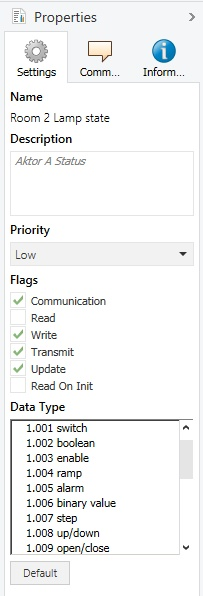
By activating the flag Read on Init of the KNX group objects in the right ETS properties panel, the Controller sends a value read query to the connected KNX device at startup. This then responds with its current object value.
In this properties panel you can also select the appropriate subdata point type of the KNX Group Object. This defines the unit of the value in the KNX system. For example DPT 9.001 represents temperature in ° C.
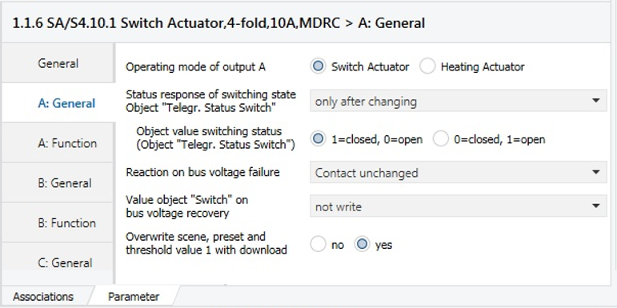
If for example the response of an actuator state is needed for an input "Aktor A Status", this feature can be enabled in the parameter of the Switch Actuator (e.g. 1.1.6 SA/S4.10.1).
The current IP address as well as further information of the PLC can be read via the ETS Device Info function. For this the physical KNX address is necessary. You can determine the address by the ETS function Programming Mode.
With the ETS function Group Monitor you can analyze the telegrams on the KNX bus. You can also use it to write/read KNX telegrams.