


Configuration of communication parameters
To set up communication between the PC and the PLC, e.g., for downloading the compiled program, the communication parameters must be configured.
The IP address of the PC must be in the same class as the IP address of the CPU.
The factory IP address of the CPU is 192.168.0.10.
The IP address of the PC should be 192.168.0.X (avoid X = 10 in order to prevent an address conflict).
The subnet mask should be 255.255.255.0.
Changing of the IP address
-
Open the Windows Control Panel. Click “Network Status Network and Sharing Center”.
-
Select “Change adapter settings”.
When using existing network with multiple devices, network rules must be observed or a system administrator consulted.
-
Right-click “Local Area Connection (Ethernet)” and select [Properties].
-
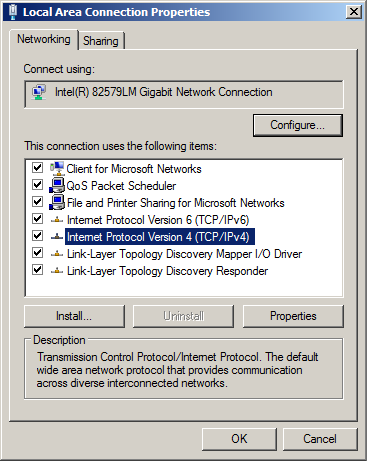
Double-click “Internet Protocol Version 4 (TCP/IPv4)”.
-
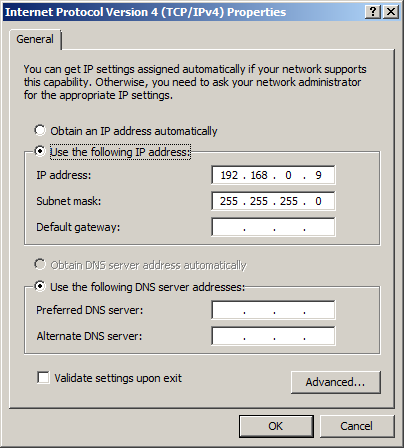
Enter the required IP address and subnet mask.